
Description
Big Foot U94 PTT (Phone Jack – Black)
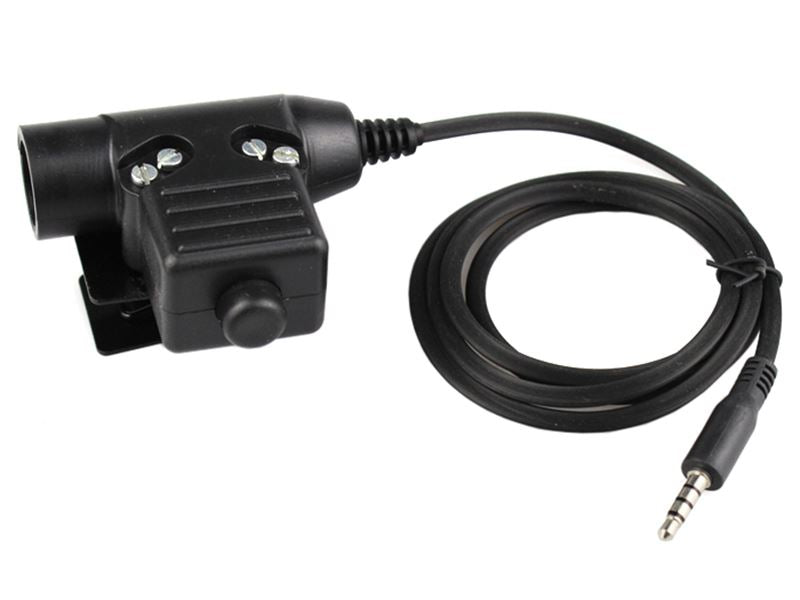
The Big Foot U94 PTT is a black push-to-talk unit in the popular U94 style, supplied here with a phone-type jack. A PTT sits between your tactical headset and your radio: the headset plugs into the PTT, the PTT lead plugs into the radio, and pressing the large button lets you transmit without reaching for the radio itself.
U94-style PTTs are one of the most common ways airsoft and milsim players connect a tactical headset to a radio. Keeping your radio in a pouch and your hand near the PTT button makes it much easier to talk to your team while still holding your replica.
How it works
Plug the headset into the PTT, then connect the PTT lead to the radio. When you press and hold the button the radio transmits through the headset microphone, and when you release it you return to listening. Test the full setup at home before game day so you know everything works together and the volume is set correctly.
The phone jack version is aimed at players who use a device with a phone-style headset socket rather than a dedicated two-way radio. Some teams use a phone-based push-to-talk app for communication, and a PTT like this lets you key the device from your chest rig instead of handling the phone. Phone sockets and apps vary, so check that your device and app work with a wired PTT before relying on it in a game.
Fitting it to your kit
Most players fit the PTT to the front of a plate carrier or chest rig, or on a shoulder strap, where the button can be found by feel without looking down. Route the leads so they do not snag on branches or get pulled when you go prone, and leave a little slack at the radio end. Check the product images for the clip or mounting on the back of the unit.
Key features
- U94-style push-to-talk unit from Big Foot
- Phone jack
- Large press-to-transmit button
- Connects a tactical headset to a radio
- Lets you transmit without handling the radio
- Black finish
Compatibility
This version has a phone-type jack for devices with a phone-type jack. Check your radio or device plug before ordering. The headset end must also match the plug on your headset, so compare the connector in the product images with your headset, or ask us in the shop if you are unsure.
Care and maintenance
Disconnect the PTT from the radio and headset after use and coil the lead loosely rather than wrapping it tightly. Avoid pulling on the cable to unplug it; hold the plug instead. Keep it dry, wipe off mud with a slightly damp cloth and let it dry fully before storing. Check the leads now and then for damage near the plugs, where cables wear first.
Who is it for?
This PTT suits airsoft and milsim players who want to connect a tactical headset to devices with a phone-type jack and talk to their team without taking their hands far from their replica.
Please note: Headset and radio are not included. Make sure the jack matches your radio or device before ordering.